


Most businesses running ERPNext have a communication problem.
Not the “our team doesn’t talk” kind. The “our conversations happen everywhere except inside the system where the data lives” kind. The sales team discusses a quotation on WhatsApp, then someone has to manually type the outcome into ERPNext. The warehouse manager sends a Slack message about a stock shortage, and accounting only finds out three days later when a customer calls to complain. The purchase approval that should have taken ten minutes bounces across four apps and takes two days because the notification landed in an email no one checks.
Raven is the first chat platform built to fix this. Not by being yet another Slack clone with a generic “AI assistant” bolted on, but by being part of the same ecosystem as ERPNext itself — built on the Frappe framework, sharing the same DNA, and capable of reading and writing your business data directly. No API keys to a third-party cloud. No brittle Zapier steps. Just a chat interface that genuinely knows what a Sales Order is.
What Raven Actually Is
Raven is an open-source, self-hosted team communication platform. It does what you’d expect a modern chat app to do: channels, direct messages, threaded conversations, file sharing, voice and video calls, emoji reactions, search. If you’ve used Slack or Discord, the surface is familiar.
Under the hood, it’s a Frappe app. That single fact changes everything.
Because Raven runs on the same framework as ERPNext, it speaks the same language — DocTypes, authentication, permissions, webhooks, the works. You install it on your existing bench or a connected server, link it to your ERPNext site, and suddenly your chat platform doesn’t just exist alongside your ERP. It’s wired into it. A user logged into Raven is the same user with the same roles as in ERPNext. A mention of “Sales Order SO-2024-0783” in a chat message can become a clickable link that pulls live data. A notification from ERPNext — “Purchase Receipt submitted” — can appear in a dedicated channel without anyone configuring an external integration. The two systems share a database connection, not just a REST bridge.
The AI Layer: Answers From Your Own Data, Not the Internet
Raven includes an AI assistant — and this is where things get interesting. It’s not a generic ChatGPT wrapper that knows nothing about your business. It uses retrieval-augmented generation (RAG) to answer questions based on your ERPNext data.
Imagine typing this into a Raven channel:
“What was the total invoiced amount for customer X last month?”
The AI doesn’t guess. It queries your live ERPNext database, retrieves the relevant Sales Invoices for that customer within that date range, and responds with a number you can trust. It can also show you the breakdown if you ask.
Other queries that work right now:
- “How many units of item ABC are in stock at Warehouse W?”
- “Show me open purchase orders for supplier Y over 5,000.”
- “What’s the leave balance for employee Z?”
- “Which sales orders are overdue for delivery?”
This is not a future roadmap item. It’s functional. And because the whole stack is open-source, the AI model can run locally if you have the hardware, or you can configure it to use an API endpoint you control. No conversation data leaves your infrastructure unless you choose to let it.
Notifications That Actually Close the Loop
Most ERPNext users rely on email alerts for things like approval requests or overdue invoices. Email works, until it doesn’t. Inboxes overflow. Important messages get buried. There’s no way to know if someone saw the notification and acted on it.
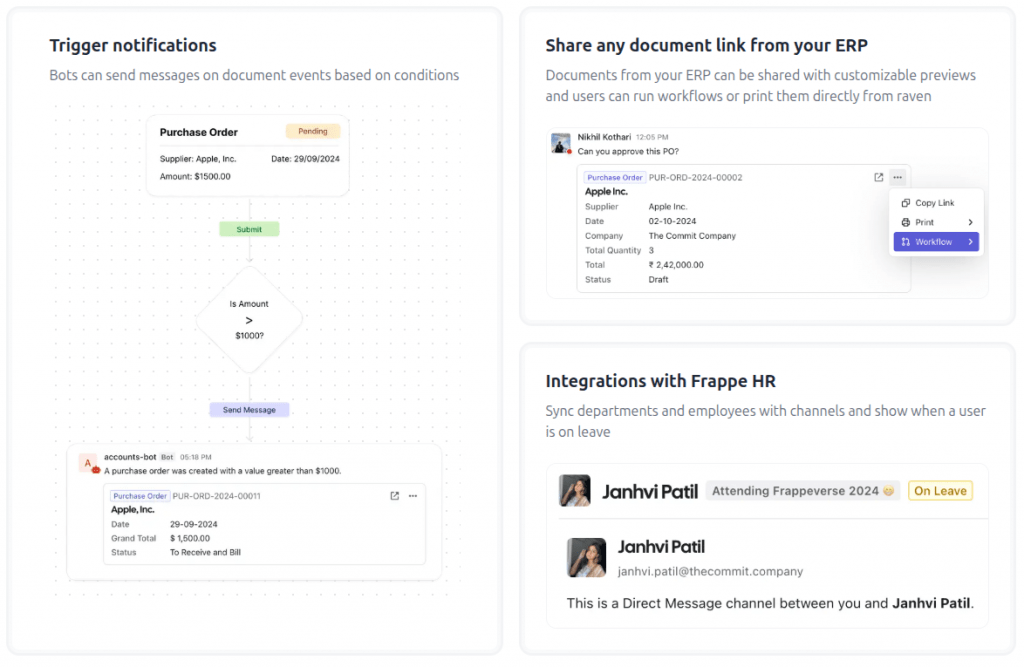
Raven replaces this with real-time chat notifications that land in dedicated channels or direct messages. Examples:
- When a Purchase Order is submitted and needs approval, the relevant manager gets a direct message with a summary and action buttons (approve/reject) that work inside chat.
- A #warehouse channel receives automatic messages when stock levels fall below reorder points, including the item code, current quantity, and a link to create a Material Request.
- An #overdue-invoices channel posts a daily digest of all invoices past due, with amounts and customer names, so the finance team sees it the moment they open Raven.
- When a lead is created in CRM, the sales channel gets a notification with the lead name, source, and assigned salesperson.
The difference from email is interaction. You don’t just read the notification. You act on it without context-switching. Approve a purchase, acknowledge a stock alert, assign a lead — all from inside the chat thread. The underlying ERPNext record updates, and the thread becomes a permanent audit trail of the conversation around that business event.
Why the Frappe Foundation Matters
There are dozens of “chat + AI” products. What makes Raven different is the architecture.
Because it’s built on Frappe, authentication is unified. Your ERPNext login works on Raven. Your role-based permissions carry over. A warehouse operator who can’t see financial data in ERPNext won’t be able to query it through Raven either. This isn’t a bolt-on integration that struggles with permission models. It’s native.
Because it’s self-hosted, data sovereignty is absolute. Nothing flows through a Silicon Valley server farm. If your ERPNext instance sits on a dedicated server in Frankfurt, your chat conversations, file uploads, and AI queries stay on that server. For businesses in regulated industries, or just businesses that don’t want their internal communications indexed by a third party, this is a hard requirement that Raven meets by design.
Because it’s open-source under AGPL, there’s no per-user pricing trap. You can have 5 users or 500. The software doesn’t care. No license key renewal, no “Pro tier” paywall for the AI features, no surprise invoice at the end of the year. The code is yours.
What the Setup Looks Like
Raven is installed as a separate site alongside your ERPNext site, connected via OAuth. If you’re running a Frappe bench already, adding it is a matter of:
- Getting the app from the repository
- Installing it on a new site
- Configuring the ERPNext site URL and API credentials
- Setting up notification channels per doctype
The AI layer requires a vector database (typically pgvector for simplicity) and a configured LLM backend, either local or API-based. The Raven documentation covers this clearly, and the setup is well within the capabilities of any administrator comfortable with bench.
For businesses on managed hosting, this is where having a provider that understands the Frappe ecosystem matters. A general-purpose cloud host will give you a VM and wish you luck. A provider that lives in this world — like us at erpnext.space — can deploy Raven alongside your ERPNext instance, configure the OAuth bridge, tune the notification rules to your workflows, and ensure the whole stack gets backed up and updated as part of the regular maintenance cycle.
Who Raven Is For, and Who It Isn’t
Raven is not an ERP replacement. It’s not a project management tool. It’s not trying to be everything. It’s a team chat layer that brings ERPNext data and workflows into the conversational surface your team already prefers.
It makes the most sense for:
- Teams that live in chat but need ERP data accessible without logging into the web interface
- Distributors and manufacturers where shop floor supervisors need quick stock checks and alerts
- Service businesses where approval chains currently span email and WhatsApp
- Any ERPNext user who wants AI that answers questions about their actual business data, not Wikipedia
It may not be necessary for a solopreneur who’s comfortable navigating the Desk interface. But for teams of ten and up, the reduction in context-switching alone pays back the setup effort within weeks.
A Quick Note on Alternatives
Slack, Teams, and Discord can all be hacked to send ERPNext notifications via webhooks. You’ll get one-way alerts — “Invoice overdue” in a channel. You won’t get bi-directional data access. You won’t get an AI assistant that queries your database. And your internal business data will transit through a third-party cloud service whose privacy policy is a PDF you didn’t read.
Raven gives you the same communication experience with none of the data leakage and all of the ERP integration depth. For a business already running ERPNext, the choice is fairly clear.
The Missing Layer Is Now Available
For years, ERPNext users have been asking for a way to make their system more conversational. Not a chatbot gimmick, but a genuine communication layer that understands the business. Raven is the first tool that delivers on that promise without breaking the open-source compact, without introducing per-user fees, and without asking you to hand your data to someone else.
If you’re running ERPNext and your team’s conversations still happen in five different places, it’s worth an afternoon to set up a test instance. The results will speak for themselves.
We run managed ERPNext hosting at erpnext.space. We’ve deployed Raven for our own internal use and for clients who want chat + AI tightly integrated with their ERPNext environment. If you’re interested, we can set it up on your dedicated instance, configure the AI layer, and make sure your notifications reach the right people — all without you touching a command line. Reach out if you’d like to see it in action.