


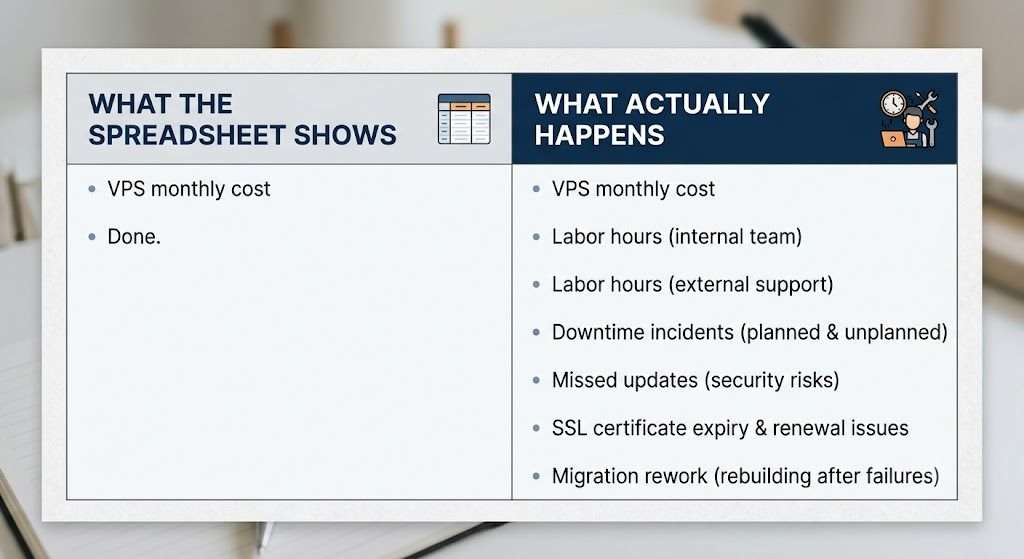
There’s a spreadsheet somewhere in your company that says you’re saving money by self-hosting ERPNext.
The math on that spreadsheet probably looks like this: a $40 VPS versus a $200 managed plan. Multiply by 12 months. That’s $1,920 saved per year. Case closed.
But spreadsheets lie. Not maliciously — they just only count the things you remember to put in them.
I’ve been on both sides of this. I’ve self-hosted ERPNext for years. I now run a managed hosting business where I regularly receive panicked emails from teams whose self-hosted setup has gone sideways. Here’s the real math nobody puts in the spreadsheet.
The Cost Nobody Talks About: Your Time Has an Hourly Rate
Let’s start with the obvious one. Someone in your organization is responsible for the server. Maybe it’s you. Maybe it’s a developer you pay. Maybe it’s a cousin who’s “good with computers.”
That person does things like:
- Running
bench updateevery couple of weeks and praying nothing breaks - Renewing SSL certificates (or forgetting to, until Chrome starts showing the red warning screen to your customers)
- Debugging why the site went down at 10 PM on a Sunday because the disk filled up with backup files nobody configured rotation for
- Figuring out why email stopped sending and discovering it’s a DKIM record issue that changed when you switched DNS providers six months ago
- Applying security patches for CVEs they learned about from a Hacker News thread, not an alerting system
Each incident is maybe an hour or two. But they add up. Conservatively, a self-hosted ERPNext instance consumes 10 to 20 hours a month of someone’s attention. Not always in neat, scheduled blocks — in interrupts. An email here, a Slack message there, a frantic phone call when the warehouse can’t print picking slips.
If that person’s time is worth $50 an hour (low for anyone who can competently manage a Frappe server), you’re spending $500 to $1,000 a month on maintenance labor. That’s $6,000 to $12,000 a year. The spreadsheet never has a row for this.
But it gets worse.
The Downtime That Costs Actual Revenue
A client came to us last year after a self-hosting disaster. Their setup: ERPNext on a mid-range VPS, managed by a developer who’d set it up two years prior and then left the company. Documentation? None. The server had been running untouched for eight months.
One day, the site went down. MariaDB had crashed and wouldn’t restart because the disk was full. The disk was full because the binary logs had never been purged. Nobody knew binary logs were a thing.
How long were they down? 31 hours.
Thirty-one hours without invoicing. Without inventory lookups. Without purchase orders. The warehouse reverted to handwritten notes and Excel. Sales people guessed at stock availability on customer calls.
Here’s the thing about ERP downtime: it doesn’t just pause your business, it compounds. Orders entered manually during the outage have to be re-keyed later. That’s double work. Angry customers call asking about deliveries that didn’t ship. That’s relationship damage you can’t put a dollar figure on. And the person who finally fixed it? They billed emergency rates — $150 an hour for 14 hours of work. That single outage cost them more than two years of managed hosting would have.
They’re our client now.
The Silent Drift: Your Instance Is Aging While You’re Not Looking
Self-hosted ERPNext has a quiet decay problem. When you’re busy running your business, running bench update falls to the bottom of the priority list. Weeks become months. Months become a year.
I’ve seen instances running Frappe v11 in 2024. Let me tell you what that means:
- Security vulnerabilities known for years, unpatched. Your financial data, customer records, and supplier contracts are sitting on a server with publicly documented attack vectors.
- No support for current payment gateways because the APIs changed and the old connectors were deprecated.
- Missing tax and compliance updates. If your country changed tax rates or reporting requirements in the last two years, your self-hosted instance doesn’t know.
- Browser compatibility breaks. Chrome updates, something in the old JavaScript stops working, and suddenly a critical form won’t submit for half your staff.
And when you finally decide to update? You can’t go from v11 to v15 in one hop. You need incremental bench migrations through v12, v13, v14. Each step can break custom scripts, doctypes, and print formats. What would have been a 2-hour maintenance window if done regularly is now a multi-day project. It lands on someone’s desk as an emergency. It costs a fortune in either internal time or external consultants.
The self-hosting spreadsheet never budgets for technical debt accumulation. But it accrues interest every single week you don’t update.
The “One Person” Problem
In most small and mid-size businesses, ERPNext self-hosting knowledge lives in one person’s head. That person configured the server, understands the bench structure, wrote the cron jobs, and knows the quirks of the setup.
What happens when they:
- Go on vacation to somewhere without internet for two weeks?
- Get a better job offer and leave with two weeks’ notice?
- Get sick at the wrong time?
I’ve seen all three. In one case, the person left and the company couldn’t even log into the server because the SSH key was only on that ex-employee’s laptop, and the root password had never been set. They had to contact the VPS provider to reset access, which took three days because they weren’t listed as the account owner.
With a managed host, the knowledge is institutional. There’s a team, not a person. There are documented procedures, monitoring systems, and someone awake when your instance misbehaves at an inconvenient hour.
The Upgrade That Breaks Everything
Let’s talk about what actually happens when a bench update goes wrong, because the “just run bench update” advice on the forum assumes everything goes right.
Here’s a real sequence from a client who self-hosted before moving to us:
- Ran
bench updateon a Friday afternoon — which is already mistake one, never run updates before a weekend. - Python dependency conflict. A package required by a custom app was incompatible with the new Frappe version. The bench build failed.
- The site went into a half-updated state. Some pages loaded, others threw 500 errors.
- They didn’t have a pre-update backup because the nightly backup script had silently stopped working three weeks ago when the disk hit 90% capacity.
- Recovery took the entire weekend: rolling back MariaDB from a manual dump taken earlier that week (lost three days of transactions), rebuilding the bench from scratch, and re-entering the missing data from paper records.
The direct cost: a ruined weekend for two people, an emergency consultant at $2,400, and three days of missing transactions. The indirect cost: the operations manager no longer trusted the system. She started keeping her own shadow spreadsheet “just in case.” That’s a cultural cost that outlasts the technical fix.
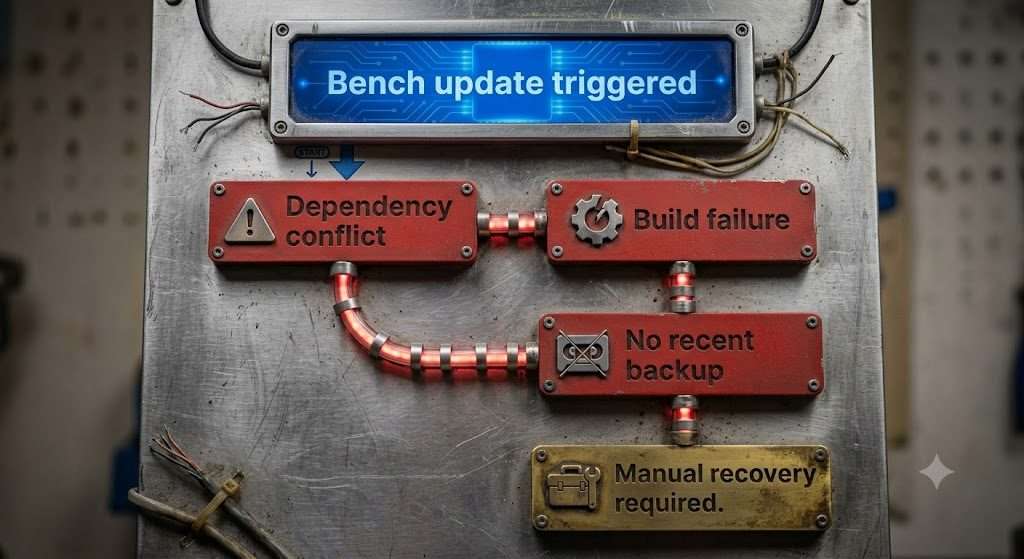
**I know,i had to have some AI images in 🙂
When Self-Hosting Actually Makes Sense
I’m not saying self-hosting is always wrong. It makes sense when:
- You have an experienced DevOps person on staff who understands the Frappe ecosystem specifically, not just Linux servers generally
- Your instance is non-critical — maybe an internal tool where 48 hours of downtime is inconvenient but not business-threatening
- You’re a development shop that’s actively customizing ERPNext and needs deep system access for testing
- You have regulatory requirements that genuinely require on-premise deployment
But if you’re a trading company, a manufacturer, a service business, or a retailer — your competitive advantage is not in running ERP servers. It’s in whatever your business actually does. Every hour you spend debugging a MariaDB deadlock is an hour not spent serving your customers, improving your product, or going home to your family.
The Real Math
Here’s what a managed ERPNext host actually provides and what it’s worth:
| What You Get | What It Replaces |
|---|---|
| Automated nightly backups with verified restore testing | Someone remembering to check the backup script |
| Bench updates during business hours, tested on staging first | Weekend emergency debugging sessions |
| Server monitoring and alerting | Finding out the site is down because a customer calls |
| SSL auto-renewal | Calendar reminder that gets ignored |
| Security patch application within hours of release | CVE threads on Hacker News |
| Someone to call when things break | Googling error messages at 11 PM |
Add up your real costs. The labor. The downtime. The consultant rescue fees. The opportunity cost of not upgrading. The tax compliance risk. The shadow spreadsheets that mean your team doesn’t trust your own system.
Then compare.
If the spreadsheet still says self-hosting is cheaper, great — at least now it’s an honest spreadsheet.
We built erpnext.space for businesses that want ERPNext to be a tool they use, not a project they manage. We handle hosting, migrations, updates, and backups. You handle your business. If you’re currently self-hosting and wondering if it’s worth switching, we’ll give you an honest assessment — even if the answer is “you’re fine, stay where you are.”